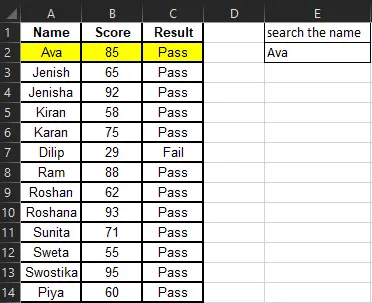
Microsoft Excel is a robust tool for data analysis, financial simulation, project management, and reporting that is commonly used by experts, students, and educators in a broad spectrum of sectors. Many users continue to keep out repetitive tasks by hand, despite its wide capabilities, shedding out on available shortcuts and automation tools that might improve accuracy and efficiency.
The key Excel shortcuts, tips, and techniques included in this extensive tutorial are intended to help you increase productivity, manage data better, and save time. With these tips, you can maximize Excel’s capabilities and work more efficiently, regardless of your level of experience.
Any well-planned spreadsheet emphasizes substantially on accurate and reliable data entry. Excel features a wide range of tools to boost data integrity, eliminate errors, and accelerate data entry. Excel data entry is an important endeavor that requires precision as well as efficiency. Accurate data entry ensures effective management and trustworthy decision-making whether you’re controlling inventory lists, customer databases, or financial records. However data entering can be time-consuming, you can significantly speed up your work efficiency by becoming expert with Excel’s shortcuts and features. The best Excel features which make data entry quicker and improve accuracy are highlighted in this article.
Key Sections:
One of Excel’s least known yet efficient options is Flash Fill. Complex formulas are no more mandatory since it detects patterns in your data and fills in the inputs appropriately. Three Procedures for Applying Flash Fill:
Procedure 1: Use of Flash Fill Fundamentals:
Procedure 2: Merging Data with Flash Fill:
Procedure 3: Flash Fill Data restructuring:
Large datasets with numerous information in one column can be separated into multiple rows using the Text to Column function.
How Text Can Be split in Columns:
Although Excel does not include an AutoNumber feature, you can still create serial numbers using easy methods.
Techniques to Automate Numbering:
=IF(B1=””,””,ROW(1:1))
Excel drop-down lists eliminate data entry mistakes and assure consistency.
How to Make a Drop Down Menu:
Display images that pop up as you hover over a cell is a fantastic way to give more context.
Tips to Make a Picture Appear on Cell Hover:
Transposing data helps you to easily change the layout of your data set.
How to Transpose Data:
Copying and pasting data in the most efficient manner is possible and can help increase the efficiency of work.
How to use it:
The Advantages of Excel Shortcuts and Tricks
Acquiring skills with these Excel tools and concepts offers several benefits in both personal and professional areas:
Conclusion
With Microsoft Excel, a spreadsheet that is both strong and versatile, you can work smarter, not harder, through applying these strategies. Developing knowledge of Excel automation tools and shortcuts will boost your efficiency and output whether you’re a learner, teacher or a professional.
Ready to build up your Excel skills to the next level? Explore more advanced training at NextStep InfoTech Training and unlock your full potential!
Have you had enough of messy, puzzling spreadsheets? Do you spend hours modifying and adjusting borders and fonts just to have a document that is still difficult to read? You’re not alone. Excel formatting errors are a typical cause of annoyance, but they don’t have to be. This post covers basic formatting issues and offers effective solutions that turn your spreadsheets from tedious to handy.
Key Sections:
The readability and understanding of your data is determined by the cell formatting.
Disturbance may occur while sorting and using formulas while cell merging. “Center Across Selection” keeps the cell structure by visually centering the text without combining the cell. For instance: Your title crosses many columns. “Center Across Selection” provides a simple way to filter and sort the data under the title by centering it without merging with the cells above it.
How to use Center Across Selection:
Dynamic borders adapt as you add or remove data.
How to apply Automatic Border:
Conditional formatting highlights data based on criteria, revealing trends and outliers at a glance.
Identify missing data quickly.
How to highlight blank cells:
Use formulas for complex conditions.
How to highlight the data:
Duplicate entries can cause inaccuracies in reports.
How to highlight duplicate entries:
How to delete duplicate entries:
Proper row and column formatting ensures easy navigation and data organization.
A simple but effective function that provides readability and an attractive presentation for your worksheets is autofitting rows and columns, which automatically adjusts rows and columns to precisely match their content.
How to auto-fit the width rows and columns:

Freeze Panes is a simple yet incredibly useful feature that can significantly improve your experience working with large spreadsheets.
How to freeze top row:
How to freeze panes:
Hiding unnecessary columns can declutter your spreadsheet. It’s a simple technique that can make a big difference in your spreadsheet workflow.
How to hide columns:
How to show columns:
One versatile method that provides you complete control over the appearance of your numerical data is custom number formatting. Numbers can be displayed as dates, percentages, currency, or with certain decimal places.
How to customize the formatting of numbers:
By leveraging data entry formatting tools, you can transform your data entry process from a tedious chore into a smooth and efficient operation.
It splits data in one column into multiple columns.
How to split the data into multiple columns:
Directly including units within cells used for calculations can create significant problems. This section explores how to visually display units while emphasizing the crucial distinction between visual presentation and accurate calculations.
How to calculate including Units:
Printing Options allow you to control how your spreadsheets are printed.
When printing multi-page spreadsheets, one of the most frustrating experiences is realizing that your column headers (or row labels) are only printed on the first page.
How to print headers on the every page:
Printing the entire sheet can be wasteful, overwhelming for the reader, and may include sensitive information you don’t want to share. Excel’s “Print Selection” feature allows you to precisely choose which parts of your spreadsheet are printed.
How to print the desired data only:
By mastering these techniques, you’ll transform your Excel spreadsheets into powerful tools for data analysis, communication, and informed decision-making. Experiment with these features, and you’ll soon be creating professional-grade spreadsheets that impress and inform.
“Master Excel, master your data.”
Excel is an efficient tool that speeds computations, automates operations, and proficiently arranges data. While logical formulae like IF, AND, and OR help decision-making, functions like SUM, AVERAGE, and VLOOKUP assist in the quick processing of data. With Excel, you can analyze trends, manage finances, and streamline workflows, making work faster and more accurate. Whether for business, finance, or personal use, mastering these tools boosts productivity and enhances efficiency. Excel’s formulas and functions allow you to turn raw data into meaningful insights, saving time and reducing errors. By learning its advanced features, you gain a valuable skill that helps you work smarter, not harder.
Key Section:
Excel’s built-in formula for statistical analysis, which involves computing averages, counts, standard deviations, and percentiles, is known as a statistical function.
Cells that match a single criteria are counted using the COUNTIF function. The syntax is as follows:
=COUNTIF(range, criteria)
For further information, click here.
It is used for a number of conditions. The syntax is:
=COUNTIFS(range1, criteria1, range2, criteria2,…)
Although they serve distinct objectives, Excel’s SUMIF and SUBTOTAL functions are both necessary for data analysis.
A single condition determines how data are added together using the SUMIF function. The syntax:
=SUMIF(range, criteria, [sum_range])
The SUBTOTAL feature in Data Validation enables users to select summary functions (like SUM, AVERAGE, and COUNT) for filtered data.
To apply the SUBTOTAL features, follow these steps:
Depending on your choice, Excel will insert subtotal rows to summarize the data for each category.
When partial matches occur in Excel functions like COUNTIF, VLOOKUP, and SEARCH, wildcards can be used.
If Flash Fill is not available in your Microsoft Excel Version, you can use Wildcard Feature(*). Here are the step to use wildcard feature to separate text:
In Microsoft Excel, you can use wildcards for partial text search in functions like COUNTIF, SUMIF, SEARCH, and FILTER. Here are the step to use wildcard feature for partial text search:
=VLOOKUP(“*Apple*”, A2:B10, 2, FALSE)
For text matching with wildcards:
=COUNTIF(A2:A10, “*data*”)
This counts occurrences where “data” appears anywhere in a cell.
Learn how to effectively clean, separate, combine, and format data using fundamental text operations. This is great for reducing messy datasets and increasing productivity.
Use MATCH rather than hardcoding column numbers:
=VLOOKUP(A2, B2:E10, MATCH(“Product”, B1:E1, 0), FALSE)
A more flexible alternative and powerful lookup function than VLOOKUP.
=INDEX(B2:B10, MATCH(“Laptop”, A2:A10, 0))
This returns the corresponding value from B2:B10 where A2:A10 contains “Laptop”.
LEFT Function:
It extracts data from the left side from n characters from a text string.
Extract the first 4 characters:
=LEFT(A2, 4)
It extracts data from the right side from n characters from a text string.
Extract the last 3 characters:
=RIGHT(A2, 3)
The MID function extracts a specific portion of text from a string, starting at any position.
=MID(A2, 3, 5)
This extracts 5 characters starting from the 3rd position.
Master the art of combining cell contents with CONCATENATE for basic text joins and TEXTJOIN for more flexible and dynamic concatenation in Excel.
Combine values from multiple cells:
=CONCATENATE(A2, ” “, B2)
TEXTJOIN is better for multiple values with separators.
=TEXTJOIN(“, “, TRUE, A2:A10)
This joins text in A2:A10 separated by a comma.
Instead of CONCATENATE, use &:
=A2 & ” ” & B2
This joins A2 and B2 with a space.
Knowing how to use these powerful Excel functions—COUNTIF, COUNTIFS, SUMIF, SUBTOTAL, INDEX-MATCH, and text functions—will significantly increase your productivity. The versatility of data processing and searches is increased by using wildcards. When sorting, searching, or combining text, these Excel tips might help you work more effectively rather than harder.
Excel, developed by Microsoft, is more than a spreadsheet program in today’s digital age; it’s a powerful package to boost decision-making, speed up work, and boost productivity. Achieving knowledge with Excel can be extremely beneficial for professionals and learners, as more than 80% of occupations require at least rudimentary knowledge of the program. Excel is a vital tool that helps you keep organized, evaluate data, and make wise decisions whether you work in marketing, finance, healthcare, education, or engineering.
Excel is an indispensable instrument that simplifies work, improves worker efficiency, and raises potential for everyone from students and job seekers to corporate executives and entrepreneurs. While possessing outstanding Excel skills improve interpersonal skills and job effectiveness, lacking Excel proficiency may result in inefficiencies, mistakes, and missed opportunities.
Numerous professionals struggle with manual data management if they lack the necessary Excel abilities, which results in inefficient and time-consuming procedures. Knowing how to use formulae, automate repetitive operations, and generate dynamic reports in Excel enhances decision-making and productivity. Because of its sophisticated features, like PivotTables, macros, and data visualization tools, Excel is a crucial ability in the cutthroat job market of today.
Becoming advanced with Excel is a tremendous advantage that boosts earning potential and employability in numerous fields. Investing in Excel training is a prudent and expert choice, regardless of your situation—beginner eager to establish a solid basis or expert user seeking to sharpen the skills you have.
At NextStep InfoTech Training Center, we eliminate the skill gap through offering comprehensive Excel guidance for all ability levels. Our friendly instructors provide you real-world expertise so that you can succeed more efficiently rather than more laboriously.
Why Choose Our Training in Excel?
STEM stands for Science, Technology, Engineering, and Mathematics. These are important subjects that help us understand the world, solve problems, and create new things. In today’s world, knowing about STEM is becoming more and more important because technology and innovation are changing our lives. STEM education helps to encourage discussion and problem-solving among students, developing both practical skills and appreciation for collaboration, according to the Institute of Art Integration and STEM.
Many countries do not have STEM subjects in their school curriculum, but there is a need for students and teachers to be exposed to low-cost initiatives that can promote integrated STEM education. Also, surveys in developing countries show STEM education needs improvement in a variety of areas.
STEM education in Nepal is still in its evolving phase. However, the government of Nepal has recognized the importance of STEM education and is taking steps to promote STEM education in the country.
The global economy is changing. Current jobs are disappearing because new jobs are emerging every day as a result of technological advances. STEM education in Nepal is helping student to be prepared for the rapidly changing job market. Since the technology is advancing day by day, the job market is also evolving day by day. So, STEM education is helping the students to apply their skills and knowledge in the real world in very efficient and effective ways. Also, STEM education in Nepal is promoting entrepreneurs and innovation, which helps in the economic growth of Nepal. STEM education in Nepal helps to address some of the challenges that Nepal is facing in different fields like healthcare, agriculture, etc.
Nepal is facing multiple challenges in promoting STEM education due to a lack of skilled teachers with strong backgrounds in science and mathematics. Also, students are facing challenges connecting their subject and implementing it in real life. One of the major challenges of STEM education in Nepal is the lack of resources and infrastructure.
Urban centers like Kathmandu have better access to modern educational tools and technologies, while rural areas often lag behind. Another challenge is the gender disparity in STEM education.
STEM opportunities in Nepal are also rising. It helps to overcome weakness by exploring different concepts through real-world activities. It also provides hands-on learning experience and offers meaningful collaboration.
The government of Nepal is taking initiatives and policies for STEM education in Nepal. For example, the government is conducting STEM scholarships and programs, which have decreased the financial burden as well as increased the interest among students for learning and applying STEM education in their daily lives, which is promoting both their financial and technical growth. Also, the National Science and Technological Council is encouraging and promoting STEM education.
A shining example of such an initiative is the NextStep Infotech Training Center in Bhaktapur. This center is making significant steps in promoting STEM education by offering courses like “Internet of Things” and “Block based Programming“. This program introduces young learners to the world of coding, fostering an early interest in technology and computational thinking. By engaging children with practical, hands-on experience in coding, NextStep Infotech is helping to cultivate the next generation of innovators in Nepal. Such programs are crucial in laying a strong foundation for STEM education, especially in regions where access to such opportunities is limited.
Initiatives like “Women in STEM South Asia” and “Nepal Women in Science” are actively working to bridge the gender gap. They are conducting different programs like mentorship programs, STEM workshops and summer camps, scholarship and financial aid programs, advocacy for policy changes, and many more.
With Nepal’s growing focus on technology and innovation, the demand for STEM professionals is on the rise. Careers in fields such as software development, data science, engineering, and biotechnology are expanding, offering new opportunities for skilled graduates. The IT sector, in particular, has seen significant growth, with companies outsourcing tech projects and startups emerging in fields like artificial intelligence, cyber security, and blockchain. Additionally, industries such as renewable energy, healthcare, and agritech are leveraging STEM expertise to drive sustainable development. As the government and private sector invest more in digital transformation, pursuing a career in STEM is becoming increasingly lucrative in Nepal.

This figure shows how the number of students interested in STEM decreases as they advance in their education. This highlights the importance of early STEM education and the need to encourage more students to pursue STEM careers.
STEM education holds the key to unlocking Nepal’s potential in the global arena. While the journey is fraught with challenges, the opportunities for growth and development are immense. By addressing the current gaps and leveraging available resources, Nepal can empower its youth to lead the country toward a brighter and more innovative future.
As Nepal continues to navigate the complexities of the 21st century, the focus on STEM education will be crucial. It is a pathway not just to individual success but to national progress, ensuring that Nepal remains a competitive and forward-looking nation on the world stage.
What do you think Nepal needs to improve STEM education? Share your thoughts below!
Choosing the path after +2 might be overwhelming to you. The course you choose after +2 will significantly influence your career. With so many options available, it can be frustrating to make a fruitful decision. In this blog, we will take you through some of the popular courses after +2. We will also discuss some of the top courses for science, management, and humanities students.
In this condition, students need details about various courses, the best colleges, and career-oriented faculties to study. So, we are bringing you some of the options for your career development.

You might be confused what to choose after +2 in Management. The best course for an individual is the one that you are interested in. So, it is important to research which one is best suited for your career program and future goals.
Here is the list of the courses after +2 in Management field:
A Bachelor of Business Administration (BBA) is a popular undergraduate degree typically lasting 4 years, divided into 8 semesters. BBA offers a comprehensive foundation in business fundamentals and management practices. If you have keen interest in Business Management, Entrepreneurship, Leadership, this course is perfect for you.
A Bachelor of Business Studies (BBS) is a popular 4-year program. BBS emphasizes on business fundamentals, accounting, economics and management principles. BBS is often chosen by students who are interested in delving deeper into business fundamentals, accounting and finance.
A Bachelor of Hotel Management (BHM) is a 4-years undergrad program with eight semesters. This course focuses on the hospitality industry, equipping students with the skills and knowledge needed to manage various aspects of hotels and restaurants. BHM is often chosen by those who have a passion for hospitality, are interested in culinary arts, desire global travel opportunities and aim for a career in the service industry.
BIM (Bachelor of Information Management) is an interdisciplinary course which combines information technology, management and business administration. It covers both technical and managerial aspects of information systems.
BTTM (Bachelor of Travel and Tourism Management) is an undergraduate degree program designed to equip students with the knowledge and skills necessary for a successful career in the travel and tourism industry. This is for those who have passion for travel and exploring new places and have keen interest in the tourism sectors.
BBM (Bachelor of Business Management) is an interdisciplinary field that combines business and management. It encompasses a broad scope of subjects, including Management, Business Functions, Quantitative Methods and Information Technology. It is a 4-years course divided into 8 semesters.
CA (Chartered Accountant) is a financial and professional course which focuses on accounting, auditing, taxation and financial management. If you’ve got strong analytical skills, interest in finance and business, and desire for professional recognition, this course is perfect for you.
Completing +2 in Science opens up a vast array of career paths. Some of popular choices are:
Bachelor of Civil Engineering (BCE) is an under graduate course that focuses on the design, construction and maintenance of the physical and natural environment. It is a 4-years course spread into 8 semesters.
Bachelor of Mechanical Engineering (BME) is a versatile degree focused on designing, analyzing, manufacturing and maintaining mechanical systems. It is a 4-year full-time graduate course and is divided into 8 semesters.
Bachelor for Computer Engineering (BCE) is an interdisciplinary course that combines electrical engineering and computer science. It is a 4-years course divided into 8 semesters.
BSc Computer Science and Information Technology (BSc.CSIT) is an interdisciplinary course that combines comprehensive understanding of both computer science and information technology. It is a 4-years course divided into 8 semesters.
Bachelor of Computer Application (BCA) is an undergraduate degree focused on computer applications and software development.

Humanities: A foundation for critical thinking, communication and cultural understanding. You have a diverse range of options to explore.
Bachelor of Arts (BA) is an under graduate 4-years degree focused on humanities, social science and liberal arts and disciplines. It provides a strong foundation in critical thinking, communication and problem solving.
Bachelor of Social Work (BSW) is an undergraduate 4-years course focused in understanding and addressing social issues.
Bachelor of Laws (LLB) is an undergraduate degree that acts as the fundamental qualification for lawyers. This degree provides comprehensive knowledge about legal principles, rules, and practices.
Bachelor of Journalism and Mass Communication (BMJC) is an undergrad program that focuses on the theory and practice of journalism and mass communication.
A Japanese company that specializes in the manufacture and distribution of mechanical components.


Along with this note, please practice your typing skills.
For 1-hour online exam, questions will be asked as:
*** Best of Luck ***
Information technology (IT) is the use of computers and other digital technologies to store, retrieve, transmit and manipulate data. In simple terms, it is the way we use computers and other technology to manage information and make our work easier. However, it all began from Industry 3.0.
People use to do all the works manually. Then came machines and technology that changed how things were made, better known as the Industrial Revolution. It began in Britain in the 1760s, largely with new developments in the textile industry. Work that people used to do by hand is now faster and easier with the help of machines.
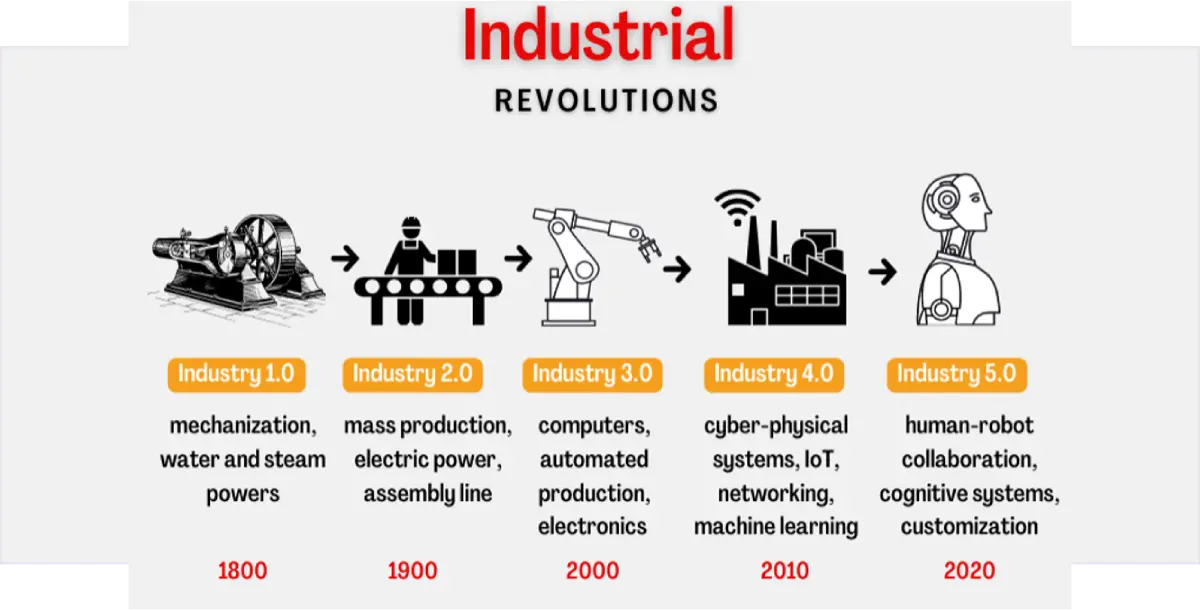
The industry revolution can be further subdivided into 5 levels. They are:
Industry 1.0: In late 1700’s, Machines replaced manual work in factories.
Industry 2.0: In late 1800’s, Electricity and mass production.
Industry 3.0: In mid-20th century, Computers and digital technology arise.
Industry 4.0: In 21st century, Smart technology and automation will become necessary.
Industry 5.0: Present and Beyond: Humans and machines working together.
Talking about the technological change that starts with computer, it shows exponential growth.
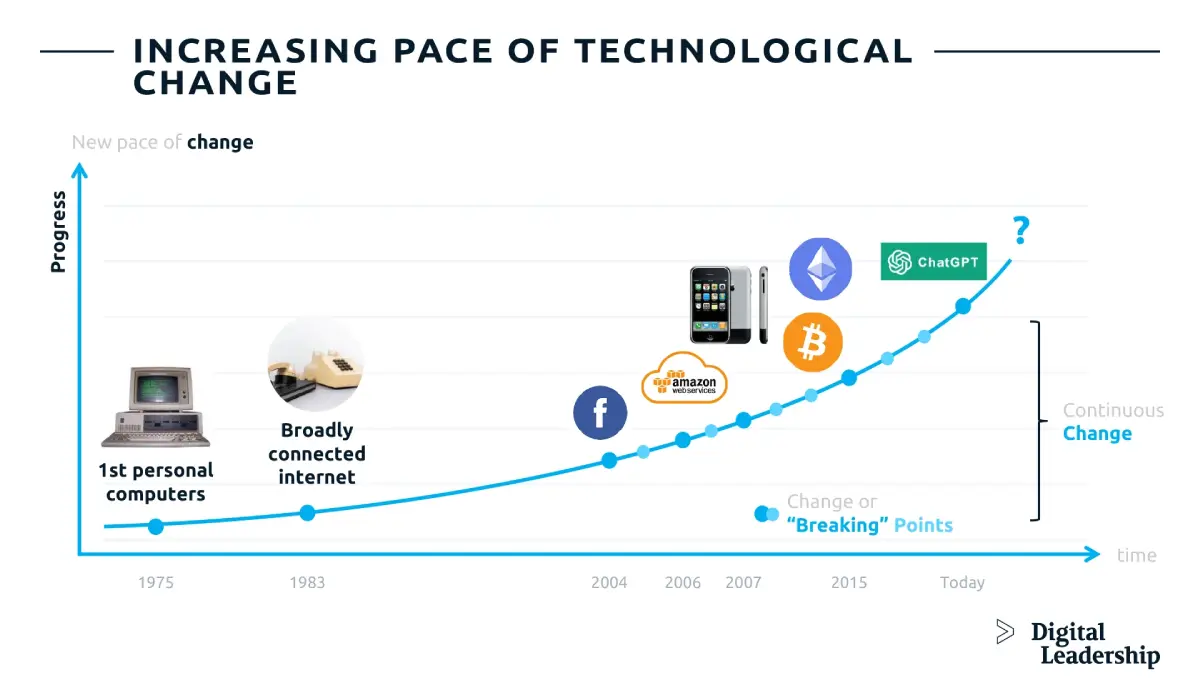
From inventing personal computers in late 1900’s to making computers intelligent at present, we have revolutionized human life so much in just around 50 years. Here are the latest technology we human beings are working on to be perfect:

Artificial intelligence (AI) and robotics are advancing rapidly, transforming industries and revolutionizing the way human beings perform tasks. Have you heard about ChatGPT or Sora AI? You can just ask AI about a wide range of topics, problems and solutions, generate creative writings like stories, easy poems, ask for suggestions and recommendations, translate languages; help in programming queries, generate images, videos from text commands; and many more. On the other hand, Robot are more human-like and fast responsive.
Suppose, I want to clean up my room at home, when I am working in an Office. Using Internet of Things (IoT), I can control my vacuum cleaner remotely via a smartphone app. When I reach my home, it’s clean. It is one of the example at my smart home and it is possible with the help of Internet of things. We can build smart room, smart home, smart cities and many more.
Quantum computing solves complicated problems that conventional computers or supercomputers are unable to handle, or cannot solve quickly enough. It does this by utilizing specialized technology, such as computer hardware and algorithms that make use of quantum physics.
Consider common PCs like vehicles traveling on a one-lane freeway. They have to abide by all traffic laws and are limited to traveling in one direction at a time. Imagine quantum computers as if they were amazing flying cars capable of simultaneous multidirectional zapping. They may travel in alternate dimensions and are exempt from the same regulations as conventional autos. Quantum computers have a unique capability that allows them to solve extremely complicated problems far more quickly than traditional computers. They resemble extremely powerful devices that are capable of feats that ordinary computers find inconceivable.

Today, with so many new devices and innovations, our world is changing so quickly that it is imperative that we become as knowledgeable about computers and technology as possible. In addition to helping us land amazing professions, being tech savvy makes it easier to complete a multitude of tasks like viewing movies, playing games, and even doing homework. Additionally, having knowledge of computers helps us tackle complex problems and provide fresh ideas. Since technology is continually evolving, keeping up with it and being prepared for whatever exciting stuff comes next is made easier by learning about it quickly. Thus, gaining rapid knowledge of computers and technology is akin to obtaining a superpower that enables us to accomplish amazing things and prepares us for the future!
One of the most frequently asked questions by SEE-appearing students is “What after SEE?”. Well, we are here to guide you if you are interested in the fields of computer science and information technology. After SEE, students can choose from a variety of courses, including IT courses in C and Python, Arduino programming, website design, graphic design, and video editing, depending on their areas of interest. And if you are new to the world of computers, this is the best time to invest in learning computer basics and Microsoft Office packages, which are lifelong skills needed in every sector.
So, why should anyone need to learn computer basics and office packages? The answer is simple, we are living in a world surrounded by technology.
What is graphic design?
The craft of planning and creating visual content to communicate ideas and messages.
Why is graphic design important?
Look around you.
What graphic design software can you learn?
Types of graphic design:


There are three types of web development. They are:
Front End: appearance of the site’s fonts, drop-down menus, buttons, transitions, sliders, and contact forms
Back End: This consists of the interactive part managing the internal part of the site or an application
Full Stack: A full-stack web developer can do it all; he masters both the back end and the front end.
Since, SEE-appearing students are in the initial stage, they can learn to develop static websites, which need HTML, CSS, and basic JavaScript.
| HTML | HyperText Markup Language | Structure your web page |
| CSS | Cascading Style Sheets | Visual part of your websites |
| JavaScript | scripting language | Adds interactive elements to your web pages |
Why learn web development?
Why learn C Programming?

Learn how to make small robots like:
Video editing is the process of manipulating and rearranging video footage to create a cohesive and visually appealing final product