Data:
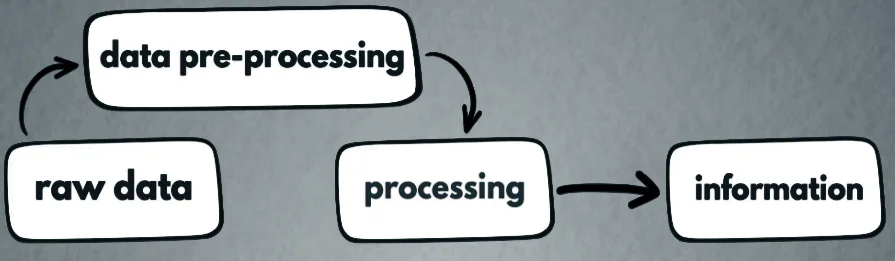
Data is defined as the raw facts and figures. It could be any number, pictures, sound, alphabet, or any combination of it which do not provide clear meaning. Examples, Ram, 12, 75, etc. Here, Ram, 12, 75 does not provide clear meaning. It could mean 12 GB RAM which costs $75 or 12 years old Ram which could give 75 kg of wool in its lifetime.
Sources of Data:
- Primary Data: Facts and figures newly collected. Examples are observation data, questionnaire data, survey data, etc.
- Secondary data: Facts and figures already collected. Examples are financial statements, customer lists, sales reports, census reports, etc.
Data Processing:
Data processing is the mechanism of converting unprocessed data into meaningful results or information.
Information:
When data are processed using a database program or software, they are converted to a meaningful result, called information. The information provides answers to “who”, “what”, “where”, and “when” questions.
Examples: Ram, roll no 12 and he scored 75 out of 100 in a test.
Difference between Data and Information
| S.N. | Data | S.N. | Information |
| 1 | It is raw or known facts. | 1 | It is processed or refined data. |
| 2 | It stores the facts. | 2 | It presents the facts. |
| 3 | It is inactive (they exist). | 3 | It is active (It enables doing). |
| 4 | It is technology-based. | 4 | It is business-based. |
| 5 | Data is gathered from various sources. | 5 | Information is transformed from data |
| 6 | Data do not have a fixed format. | 6 | Information is normally in the form of tables, graphs, curve lines, etc. |
Flat File/ File based system:
- It is a traditional way to keep records of any organization in a manual filing system. It means to be used to keep records in file-based or flat file systems non-computerized.
- A flat file system is a system of flies in which every file in the system must have a different name.
Limitation of file-based/ Flat file system
- Duplication of data ( Data Redundancy)
- Inconsistent data.
- Program Data Dependence.
- Poor data control.
- Limited data sharing.
- Security problems.
- Incompatible file formats.
- Fixed queries
Database System:
A database system consists of a collection of interrelated data and a set of application programs to access, update and manage the data.
Database:
It is organized form of record about some person, organization or something store under certain media. It is a collection of related information about a subject organized in a useful manner that provides a base or foundation for procedure, such as retrieving information, drawing conclusion and make decision.
Advantage of database over flat file or file based system :
- Reduction of data redundancies
- Shared data
- Data independent
- Improved integrity
- Efficient data access
- Multiple user interface
- Improved security
- Improved backup and recovery
- Supports for concurrent transactions
- Unforeseen queries can be answered
File based system Vs Electronic Database System
| S.N. | File Based System | S.N. | Electronic Database System |
| 1 | It provide detail of the data representation and storage of data. | 1 | Database System gives abstract view of data that hides details. |
| 2 | It doesn’t have a crash recovery mechanism. | 2 | It provides crash recovery mechanism using backup and other security measures. |
| 3 | It is difficult to reduce data redundancy. | 3 | Data redundancy can be done easily. |
| 4 | Searching of data requires a lot of time and effort. | 4 | Data can be easily searched. |
| 5 | Difficult to maintain the database. | 5 | Easy to maintain the database. |
Database Management System (DMBS):
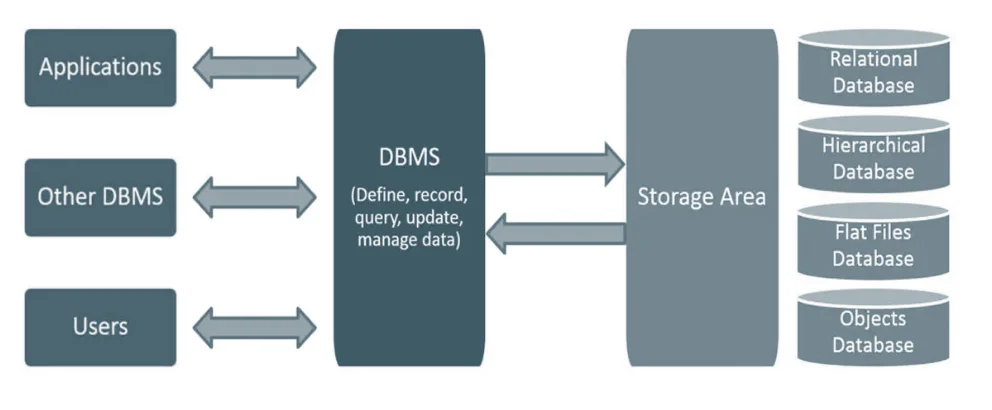
Database Management System is software that manages the data stored in a database. This is a collection of software which is used to store data, records, process them and obtain desired information. Since, data are very important to the end users, we must have a good way of managing data. A DBMS is a collection of programs that manages the database structure and controls access to the data stored in the database. The DBMS make it possible to share the data in the database among multiple applications or users. The DBMS stands between the database and the user.
Examples: MS-Access, Oracle, FoxPro, dBase, SQL server, MySQL, Delphi, Sybase, etc.

Architecture of DBMS
Why to Use DBMS?
- To develop software application in less time.
- Data independence and efficient use of data.
- For uniform data administration.
- For data integrity and security.
- For concurrent access to data, and data recovery from crashes.
- To use user friendly declarative query language.
Some major database System activities are (Functions of DBMS)
- Adding new file to the database.
- Inserting data into the database.
- Retrieving/viewing data from the database.
- Updating data in existing database file.
- Deleting data from the database file.
- Removing files from the database.
Advantages of DBMS (Features/Objectives of DBMS)
- Sharing data
- Reduced data redundancy
- Data backup and recovery
- Inconsistency avoided
- Data integrity
- Data security
- Data independence
- Multiple user interfaces
- Process complex query
Disadvantages of DBMS:
- Expensive
- Changing Technology
- Needs Technical Training
- Backup is Needed.
Field/ Attribute:
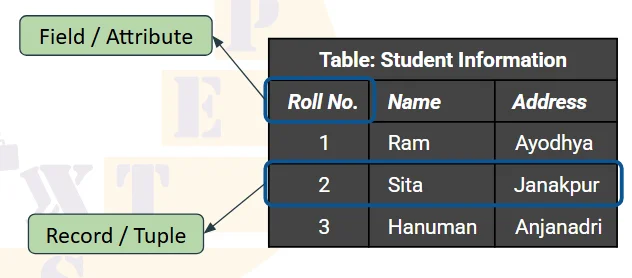
A field is a piece of information about an element. A field is represented by a column. Every field has got a title called the field title.
Record (Tuple):
A record is information about an element such as a person, student, an employee, client, etc. A record can have much information in different heading or titles.
Table:
A table is the arrangements of rows and columns. Each table must have unique name and must be simple. It is the place where data and information are stored.
Objects:
Database Objects are the essential tools of relational database. These database objects helps to store, view, edit and manipulate the data and information stored in database.
It can be used to hold and manipulate the data. Some of the examples of database objects are view, sequence, indexes, form, query report etc.
❖ Table: Basic unit of storage; composed rows and columns
❖ View: Logically represents subsets of data from one or more tables
❖ Sequence: Generates primary key values
❖ Index: Improves the performance of some queries
❖ Synonym: Alternative name for an object
Some Basic Terms used in Database
❖ Schema: A schema is the structure of database which defines name of tables, data fields with data types, relationships and constraints.
❖ Instance: It defines data values in a record.
❖ Entity: An entity is a thing or object in the real world that is different from other objects.
❖ Attribute: Attribute is properties possessed by an entity or relationship.
❖ Index: It is used to create indexes in database. It helps searching and sorting operation faster and improves the performances of queries.
❖ Query: It is the object of DBMS which is mainly used to extract and upgrade the necessary records that are present in the database.
❖ Form: It is object of database which is mainly used for data entry. It is easy to add, modify and delete the records in form.
❖ Report: Report are the printed output that is created from table or query. We can’t add, modify and delete the records in report.
Keys of DBMS:
Key is a field that uniquely identifies the records, tables or data. Key in a table allows us to establish the relation between multiple tables. Keys are also useful for finding the unique records or combination of records from a large database tables.
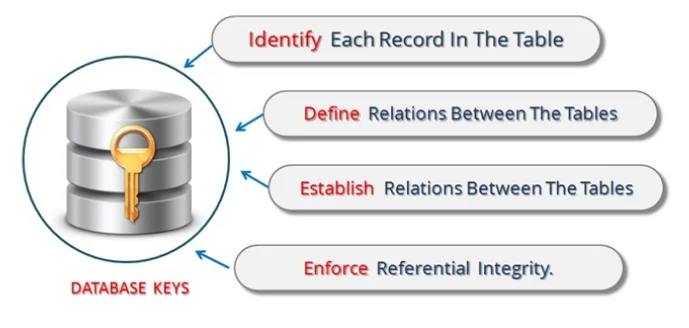
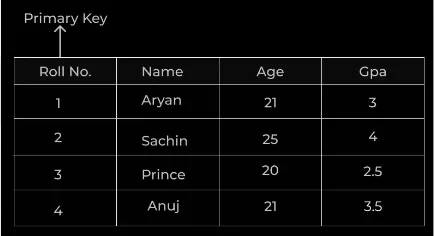
❖ Primary Key: A primary key is one or more columns in a table used to uniquely identify each row in the table. Primary key cannot contain Null value.
A primary key is a special relational database table column (or combination of columns) designated to uniquely identify each table record. A table cannot have more than one primary key.
A primary key’s main features are:
⮚ It must contain a unique value under the field.
⮚ It cannot contain null values.
⮚ Every row must have a primary key value.
❖ Foreign Key: Foreign keys represent relationships between tables. A foreign key is a column whose values are derived from the primary key of some other table.
❖ Candidate Key: If a relational schema has more than one key, that is called a candidate key. All the keys which satisfy the condition of primary key can be candidate key. There can be any number of candidate keys that can be used in place of the primary key if required.
❖ Alternate Key/ Secondary Key: Alternative keys are those candidate keys which are not the primary key. There can be only one primary key for a table. Therefore all the remaining candidate keys are known as alternative.
❖ Compound Key: It has two or more attributes that allow you to uniquely recognize specific record. It is possible that each column may not be unique by itself within the database.

SQL (Structured Query Language):
It is an international standard database query language for accessing and managing data in the database.
Features of SQL
- It is a non-procedural Language.
- It is English like language.
- It can process a single record as well as sets of records at a time.
- It is a data sub-language consisting of three built in language: DDL, DML, DCL etc.
- It insulates the user from the underlying structure and algorithm.
- It has the facilities for defining tables, views, security, integrity, transaction control etc.
- DDL (Data Definition Language): DDL is used by the database designers and programmers to specify the content and structure of the table. It is used to define the physical characteristics of records. It includes commands that manipulate the structure of objects such as views, tables, and indexes, etc.
| » CREATE: Create is used to create the database or its objects (like table, index, function, views, store procedure and triggers). |
| » DROP: Drop is used to delete objects from the database. |
| » ALTER: Alter is used to alter the structure of the database. |
| » TRUNCATE: Truncate is used to remove all records from a table, including all spaces allocated for the records are removed |
| » COMMENT: Comment is used to add comments to the data dictionary. |
| » RENAME: Rename is used to rename an object existing in the database. |
- DML (Data Manipulation Language): DML is related with manipulation of records such as retrieval, sorting, display and deletion of records of data. It helps user to use query and display reports of the table. So it provides technique for processing the database.
| » SELECT: It is used to retrieve data from a database. |
| » INSERT: It is used to insert data into a table. |
| » UPDATE: it is used to update an existing data in table. |
| » DELETE: It is used to delete record from table. |
- DCL (Data Control Language): DCL provides additional features for security of table or database. It includes commands for controlling data and access to the database. Examples of these commands are commit, Rollback, Grant etc. .
| ⮚ GRAND: It gives user’s access privileges to database. |
| ⮚ REVOKE: It is used withdraw users’ access privileges given by using the GRANT command. |
Database Model:
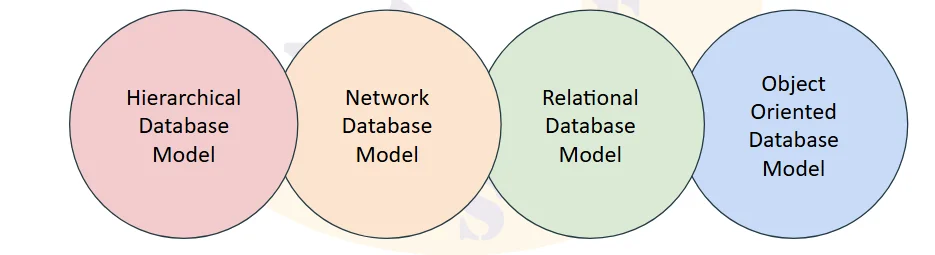
A Database model defines the logical design and structure of a database and are used to show how data will be stored, accessed and updated in a Database Management System. It refers to the layout of a database and helps in designing a database.
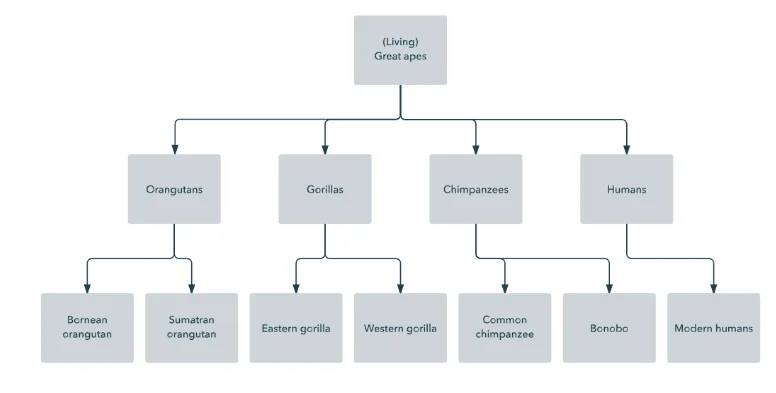
- Hierarchical database model: this is one of the oldest types of database models. In this model data is represented in the form of records. Each record has multiple fields. All records are arranged in database as tree like structure. The relationship between the records is called parent child relationship in which any child record relates to only a single parent type record.
Advantages:
- It is the easiest model.
- Searching is fast and easy if parent is known.
- It is very efficient in handling one to one and one to many relationships.
Disadvantages:
- It is old and outdated database model.
- It does not support many to many relationships.
- It increases redundancy because same data is to be repeated in different places.
2. Network database model: It replaced hierarchical network database model due to some limitations on the model. Suppose, if an employee relates to two departments, then the hierarchical database model cannot arrange records in proper place. So a network database model was created to arrange a non-hierarchical database. The structure of the database is more like a graph rather than a tree structure. A network database model is a database model that allows multiple records to be linked to the same owner file. The network model allows each child to have multiple parents.

Advantages:
- It accepts many to many relationships, so it is more flexible.
- The searching is faster because of multidirectional pointer.
- The network model is simple and easy to design.
- It reduces the redundancy.
Disadvantages:
- It is difficult to handle the relationship in complex programs.
- There is less security because of sharing data.
- It increases the processing overhead due to the complex relationship.
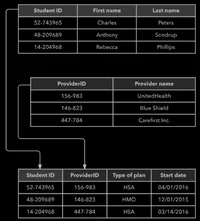
- Relational database model: in this model, the data is organized into tables which contain multiple rows and columns. These tables are called relations. A row in a table represents a relationship among a set of values. Since a table is a collection of such relationships, it is generally referred to the mathematical term relation, from which the relational database model derives its name.
We notice from below table, here each student has a unique roll number and has marks of subject. Here Roll makes relation between these two tables.
Advantages:
- The breaking of complex database table into simple database table becomes possible.
- Database processing is faster than other model.
- There is very less redundancy.
- The integrity rules can easily be implemented.
Disadvantages:
- It is more complex than other models.
- There are too many rules because of complex relationships.
- It needs more powerful computers and data storage devices.
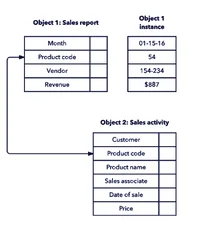
- Object oriented database model: In the object-oriented model, both data and their relationships are contained in a single structure known as an object. An Object-Oriented Model reflects a very different way to define and use entities. An object includes information about relationships between the facts within the object, as well as information about its relationships with other objects. An objects include data, various types of relationships, and operational procedures, the object becomes self-contained, thus making the object-at least potentially-a basic building block for autonomous structures.
Advantages:
- Semantic content is added.
- Visual representation includes semantic content.
- Inheritance promotes data integrity.
Disadvantages:
- Slow development of standards caused vendors to supply their own enhancements, thus eliminating a widely accepted standard.
- It is a complex navigational system.
- There is a steep learning curve.
- High system overhead slows transactions.
Entity Relationship Diagram:
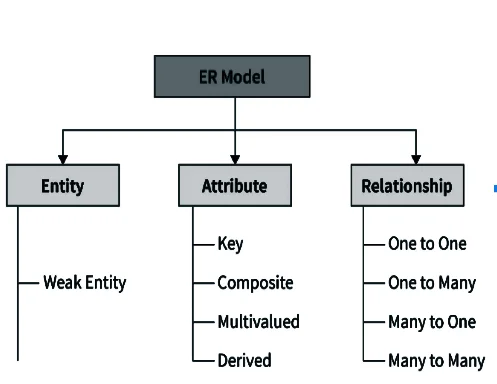
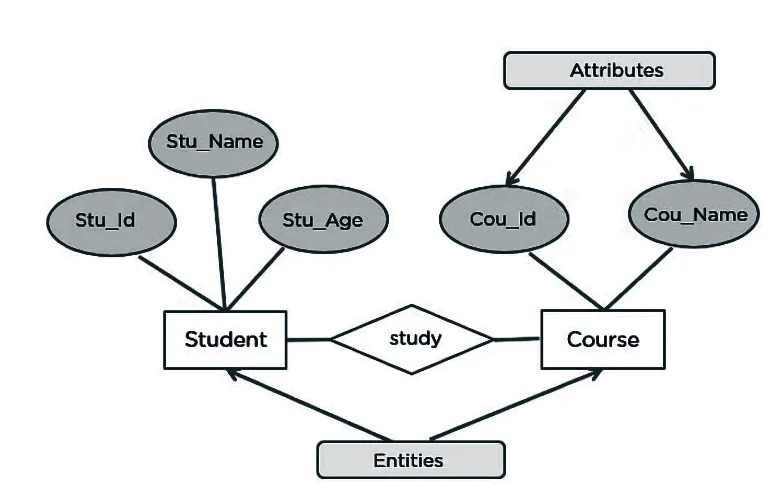
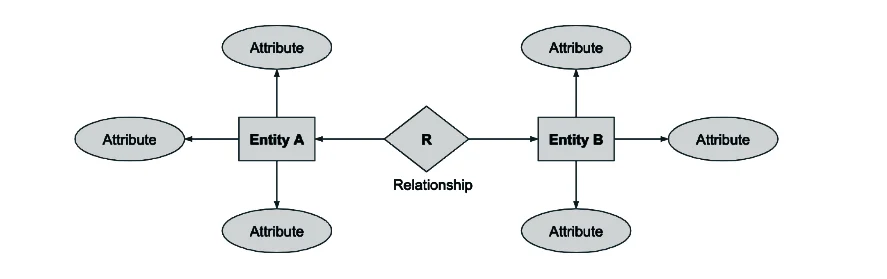
The diagrammatic representation of entities attributes and relationship is called E-R diagram. The E-R diagram is an overall logical structure of a database that can be expressed graphically. It was developed to facilitate database design. It is graphical representation of database.
Components of E-R Diagram
Entity: An entity is defined as anything about which data to be collected and stored.
Relationships: Relationships describes associations among data. Most relationships describes associations between two entities.
Attribute: Attribute describes particular characteristics of the entity.
Relationship and its types:
A relationship is an association among several entities and represents meaningful dependencies between them. It is represented by diamond. There are 3 types of relationship:
- One to one
- One to many
- Many to many
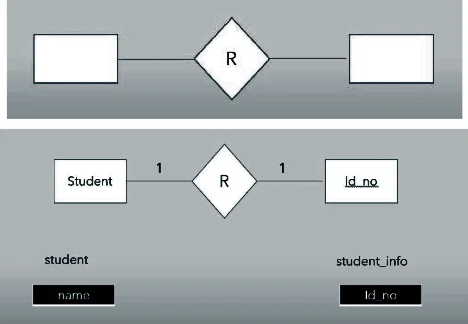
- One to one: if one record of an entity is related with only one record of another entity then such type of relationship is called one to one relationship.
- College————-Principal
- Bank —————-Manager
- Driver—————-Car
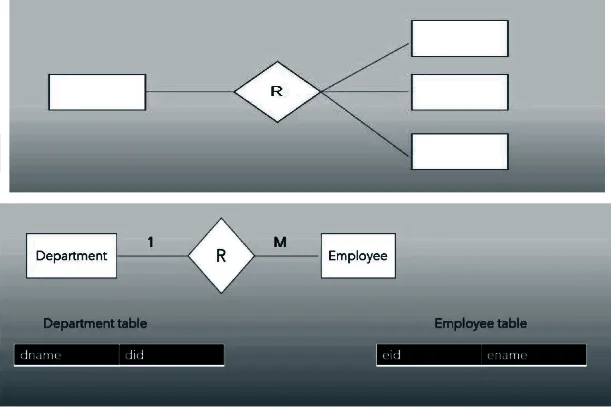
- One to many: If one instance of one entity is related with many instances of other entity then it is called the one to many relationship.
- College——————students
- Bank ——————— Employers
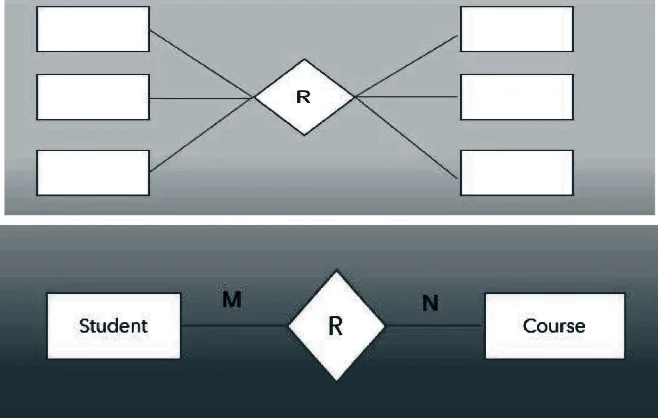
- Many to many: If many instances of the one entity are related with many instances of another entity then it is called many to many relationship.
- Teachers —————–students
- Books ——————–Readers
- Employers ————–Customers
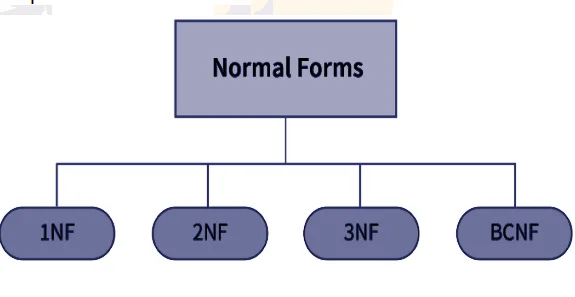
Concept of Normalization
Normalization is a database design process in which complex database table is broken down into simple separate tables. It makes data model more flexible and easier to maintain.
⮚ Database Normalization is a technique of organizing the data in the database. It is a systematic approach of decomposing the tables to eliminate data redundancy and inconsistency. The data is said to be redundant if there is duplicate or repeated data in the table.
⮚ Normalization divides the larger table into the smaller table and links them using relationship. It increase clarity in organizing data in the database.
For example:
Below table shown is our database without normalized. Here in table we can see that for the large records of this table, there would be multiple data row of same values especially in the country and city column. So, we can normalize the table by splitting it into two tables where one table only stores the location area of each person name and could be referenced by some unique id. Say Area code.
| Id | Name | Country | City |
| 101 | Alex | Nepal | Kathmandu |
| 102 | Martin | India | Delhi |
| 103 | Melman | Nepal | Kathmandu |
| 104 | Gloria | Japan | Tokyo |
The above table can be normalized in two tables as below:
| Country | City | Area Code |
| Nepal | Kathmandu | N1 |
| India | Delhi | I1 |
| Japan | Tokyo | J1 |
| Id | Area Code | Name |
| 101 | N1 | Alex |
| 102 | I1 | Martin |
| 103 | N1 | Melman |
| 104 | J1 | Gloria |
Advantages of Normalization:
- It reduces the data redundancy.
- It improves faster sorting and index creation.
- It improves the performances of the database system.
- It simplifies the structures of table.
- It avoids the loss of information.
Disadvantages of Normalization:
- It is complex to design due to the relationship between tables.
- It requires more CPU cycles.
- It requires large memory.
- It requires more joins to get the result.
- Maintenance overhead.
Types of Normalization
- 1NF (First Normal Form):
A table is said to be in first normal form if it has atomic values. There shouldn’t be any repeating groups of attribute in the table. First normal form sets the very basic rules for an organized database.
- The data field should be a single (atomic) valued attribute/ columns.
- It eliminates duplicates rows and columns from the same table.
- It minimizes the data redundancy in the database table.
- 2NF (Second Normal Form):
A table is said to be in 2NF if it is a First normal form and it doesn’t have the partial dependency. Second normal form further addresses the concept of removing duplicate data. o It should be in the first normal form.
- It should not have partial Dependency.
- It identifies data dependencies.
- Non key attributes are functionally depends on key attribute (primary key).
- 3NF (Third Normal Form):
Third normal form goes one large step further.
- It should be in the second normal form.
- It removes transitive dependencies in a table.
- All non-primary key attribute must dependent on primary key attribute or attribute.
In Details Normalization with Examples
Un-normalized:
A table is said to be un-normalized when there is repetition of data in a table. In un-normalized table records are not atomic. Let’s take an example of unnormalized table.
Un-normalized table:
Table No.1
| Roll No. | Name | Faculty | Subject |
| 1 | Sundar | ICT | Java, OS |
| 2 | Mukesh | ICT | Network |
| 3 | Ganesh | ICT | C, Web |
- 1NF (First Normal Form):
A table is said to be in first normal form if it has atomic values. There shouldn’t be any repeating groups of attribute in the table. Following are the main rules for table to be in 1NF:
⮚ Table should have single (atomic) valued attributes/columns.
⮚ Values stored in columns should be of same domain.
⮚ Columns name should not be repeated in table.
⮚ The order of column names doesn’t matter.
The table given above in un-normalized data meets the three requirements among four to be in first normal form. In the subject column more than one subject are stored in a single column for two students. But, each column must contain atomic value to be in first normal form. And the problem is solved in the table given below:
Example of 1NF for above table No.1
Table No.2
| Roll No. | Name | Faculty | Subject |
| 1 | Sundar | ICT | Java |
| 1 | Sundar | ICT | OS |
| 2 | Mukesh | ICT | Network |
| 3 | Ganesh | ICT | Web |
| 3 | Ganesh | ICT | C |
Though, some values are repeated but all columns are atomic for each record /row.
- 2NF (Second Normal Form):
A table is said to be in 2NF if it is in First normal form and it doesn’t have the partial dependency. i.e. each attributes should functionally depend on primary key. Rules for 2 NF:
⮚ A table should be in first normal form.
⮚ There must not be partial dependency.
⮚ Partial dependency exists when any attribute of a table depends on only one part of a composite primary key (primary key combining more than one field) and not on the complete primary key.
⮚ To remove partial dependency, a table can be divided and attributes creating partial dependency are removed in some other tables.
Situation of Dependency:
Let’s take an example of table student with student_id, name, address and age as its columns.
| Student_id | Name | Address | age |
Here student_id is the primary key which can identify each records uniquely and can be used to fetch any row of data from this table.
| Student_id | Name | Address | Age |
| 15 | Ganesh | KTM | 17 |
| 16 | Janaki | BKT | 17 |
Here we can get name, address and age of the student easily from their student_id. Which means each column can be fetched using primary key. So, all needed is student_id and every other column depends on it or can be fetched using it.
This is called dependency or functional dependency. And this kind of dependency must be in table to be in second normal form.
Situation for partial dependency:
In above table a single filed student_id uniquely identifies the all the records of the table. But in some cases combination of two or more columns or fields makes the primary key. Where more than one field acts as primary key. Lets create a table named subject with fields subject_id and subjectname.
| Subject_id | Subjectname |
| 101 | Math |
| 102 | Science |
| 103 | Nepali |
Above we have two tables: student and subject for storing student’s and subject’s information. Now, let’s make a table named Mark storing student’s mark in respective subjects with subject teacher.
| Score_id | Student_id | Subject_id | Marks | Teacher |
| 1 | 15 | 101 | 55 | Bishnu |
| 2 | 15 | 102 | 65 | Umesh |
| 3 | 16 | 103 | 88 | Janvi |
Note: the above table is not in 2nd normal form.
In above table student_id is used to get student’s information where as subject_id is used to get subject name. The combination of student_id and subject_id is the primary in above table. It is because if we want to get mark of student with id 15 then we cannot get because we don’t know which subject. Here we have to give sudent_id and subject_id to uniquely identify any row.
Is there a partial dependency in above table? Obviously, yes. In the given table Mark column name teacher is only dependent on the subject, for math there is Bishnu for science Umesh and so on. But the primary key is the combination of student_id and subject_id, teacher’s name depend only on subject, i.e. subject_id not on the student id.
This situation is known as partial dependency, where an attribute/ column in table depends on only a part of primary key not on the whole key.
Removing the partial dependency:
Above table can be normalized in second normal form by removing teacher’s name from the Mark table adding it to Subject table.
Subject:
| Subject_id | Subjectname | Teacher |
| 101 | Math | Bishnu |
| 102 | Science | Umesh |
| 103 | Nepali | Janvi |
Mark:
| Score_id | Student_id | Subject_id | Marks |
| 1 | 15 | 101 | 55 |
| 2 | 15 | 102 | 65 |
| 3 | 16 | 103 | 88 |
Summary:
⮚ For table to be in second normal form, it should be in first normal form.
⮚ Partial dependency exists, when non primary key attribute depends only on a part of primary key instead of complete primary key.
⮚ Partial dependency can be removed by breaking a table and removing attributes causing partial dependency.
-
- 3NF (Third Normal Form):
A table is said to be in third normal form, if it is second normal form and it doesn’t have any transitive dependency in primary key. The elements that are not dependent on primary key are removed. Transitive dependency occurs in table when a non-primary key attribute depends upon another non primary key attribute. All non-primary key attribute must dependent on primary key attribute or attributes.
Transitive Dependency?
Transitive Dependency occurs when a non-primary key attribute depends upon another non primary key attribute instead of primary key attribute or primary key.
For instance:
In the above table Mark, let’s add some more information such as Exam_name and Full_mark.
| Score_id | Student_id | Subject_id | Marks | Exam_name | Full_marks |
| 1 | 15 | 101 | 55 | First Term | 500 |
| 2 | 15 | 102 | 65 | First Term | 500 |
| 3 | 16 | 103 | 88 | Second Term | 300 |
In above table, student_id and subject_id are the primary key. The column exam_name depends on both student_id and subject_id. But, the Full_marks depends on the Exam_name. The first term exam might have 500 full mark but the second term may have 300 or others. Here exam_name is neither primary key nor the part of primary key still, Full_mark depends on it. So, here full_mark which is non-primary key attribute depends on another nonprimary key attribute known as Exam_name. This situation is known as transitive dependency.
Removing Transitive Dependency:
Again, table should be broken into small individual tables to remove it. So we need to remove those fields which are creating transitive dependency. Which looks like.
Score Table
| Score_id | Student_id | Subject_id | Marks | Exam_Id |
| 1 | 15 | 101 | 55 | 11 |
| 2 | 15 | 102 | 65 | 12 |
| 3 | 16 | 103 | 88 | 13 |
Exam Table
| Exam_id | Exam_Name | Full_Marks |
| 11 | First Term | 500 |
| 12 | Second term | 300 |
Benefits of removing transitive dependency:
⮚ Amount of data duplication is reduced.
⮚ Data integrity is achieved.
Note: Normalization does not eliminate data redundancy. Instead, it reduces the redundancy.
Example of normalization:
Un-normalized Table:
| Employee Id | Name | Address | Department |
| 101 | Ram | Kathmandu | Sales |
| 102 | Bikky | Bhaktapur | Marketing, Export |
| 103 | Anusha | Lalitpur | import |
First Normal Form:
| Employee Id | Name | Address | Department |
| 101 | Ram | Kathmandu | Sales |
| 102 | Bikky | Bhaktapur | Marketing |
| 102 | Bikky | Bhaktapur | Export |
| 103 | Anusha | Lalitpur | import |
Second Normal Form:
Let’s take a table employee having more than one department.
| Employee Id | Department | Salary |
| 101 | Sales | 20000 |
| 102 | Marketing | 25000 |
| 102 | Export | 25000 |
| 103 | Import | 20000 |
Here the non-primary key attribute salary dependent on the employee id only. Here Employee id and department are the candidate key. This violates the rule that “no non primary attribute is dependent on the part of primary key or on the subset of candidate key.”
To make table in 2NF we can break it as:
| Employee Id | Salary |
| 101 | 20000 |
| 102 | 25000 |
| 102 | 25000 |
| 103 | 20000 |
| Employee Id | Department |
| 101 | Sales |
| 102 | Marketing |
| 102 | Export |
| 103 | Import |
Third Normal Form:
| Employee Id | Name | Department | HoD |
| 101 | Rikesh | HR | Mukesh |
| 102 | Binita | Marketing | Mukesh |
| 102 | Jagdish | Store | Bikash |
Here, Employee Id is the primary key and all other are non-primary key attributes. The non- primary key attribute HoD is dependent on non-primary key attribute Department. Here, transitive dependency occurs. To remove it we can decompose table as:
| Employee Id | Department Id | Name |
| 101 | A10 | Rikesh |
| 102 | A11 | Binita |
| 102 | A12 | Jagdish |
| Department Id | Department | Name |
| A10 | HR | Mukesh |
| A11 | Marketing | Mukesh |
| A12 | Store | Bikash |
Another Normalization
Example 1
Unnormalized database
| Emp_code | January |
| Emp_name | February |
| Address | March |
| Contact no. | April |
| Date of Birth | May |
| Department | June |
| Designation | July |
| Basic_salary | Daily_allowance |
| Travel_Allownace | Gross_salary |
| Tax | Provident_fund |
Normalized database
| Employee | Salary | Month |
| Emp_code | Basic salary | January |
| Emp_name | Travel allowance | February |
| Address | Daily allowance | March |
| Contact no. | Gross salary | April |
| Date of birth | Provident Fund | May |
| Department | Tax | June |
| Designation | July |
Example 2
| Name | Roll | Class | Sub_name | Sub_marks | Sub_name | Sub_marks |
| Ram | 1 | 11 | Computer | 95 | Account | 78 |
| Sita | 1 | 12 | Computer | 98 | Account | 80 |
| Hari | 2 | 11 | Computer | 80 | Account | 82 |
| Shyam | 2 | 12 | Computer | 92 | Account | 83 |
In above table, we can see that column of subject nome and marks are repeated which are eliminated in 1NF.
| Name | Roll | Class | Sub_name | Sub_marks |
| Ram | 1 | 11 | Computer | 95 |
| Ram | 1 | 11 | Account | 78 |
| Sita | 1 | 12 | Computer | 98 |
| Sita | 1 | 12 | Account | 80 |
| Hari | 2 | 11 | Computer | 80 |
| Hari | 2 | 11 | Account | 82 |
| Shyam | 2 | 12 | Computer | 92 |
| Shaym | 2 | 13 | Account | 83 |
In above table name depends upon roll no and class, subject name only depends upon class, subject marks depends upon name and subject_name. Hence, above table can be decomposed as 2NF:
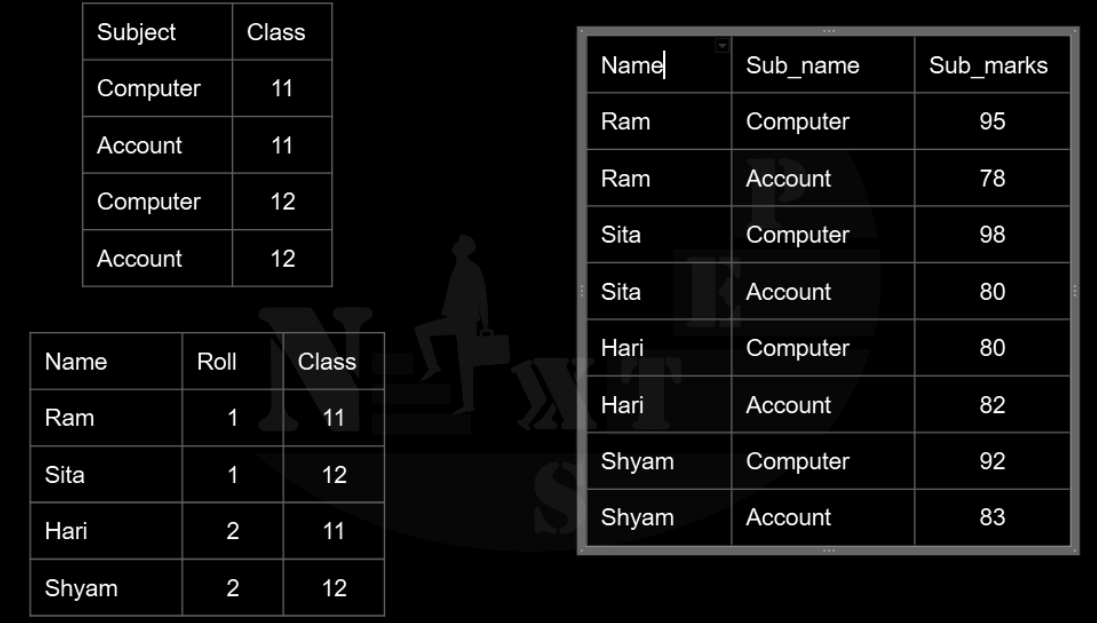
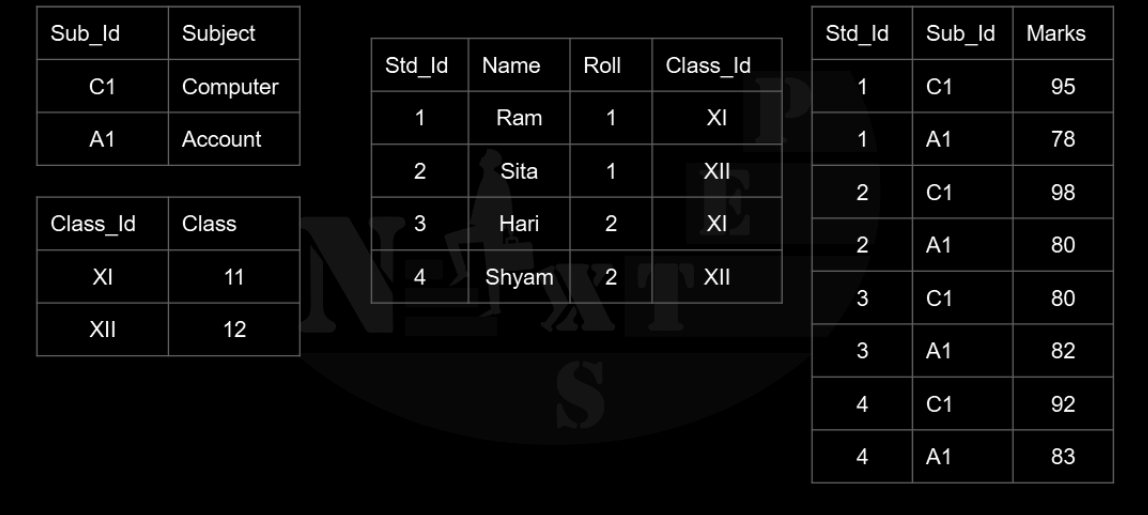
It removes the column that are not dependent on primary key using 3NF above table can be decomposed as:
Centralized database system Vs. Distributed database system:
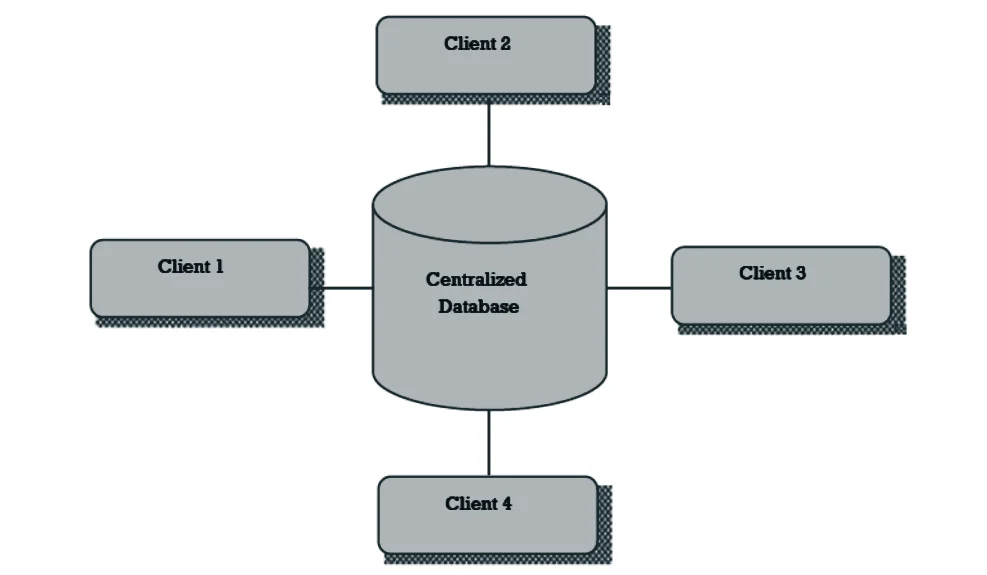
Centralized database system:
⮚ The database system where data and information are stored in the centralized server or centralized database system.
⮚ The data stored in database are accessed from different locations through several applications. The information (data) is stored at a centralized location and the users from different locations can access this data.
⮚ This type of database contains application procedures that help the users to access the data even from a remote location.
Advantages:
⮚ It decreases risk of data manipulation. i.e. manipulation of data will not affect the core data.
⮚ Data consistency is maintained as it manages data in a central repository.
⮚ It provides better data quality, which enables organizations to establish data standards.
⮚ It is less costly as fewer vendors are required to handle the data sets.
Disadvantages:
⮚ The size of centralized database is large which increases the response time of fetching data.
⮚ It is difficult to update the centralized database.
⮚ If server gets damaged entire data will be lost.
Distributed database system:
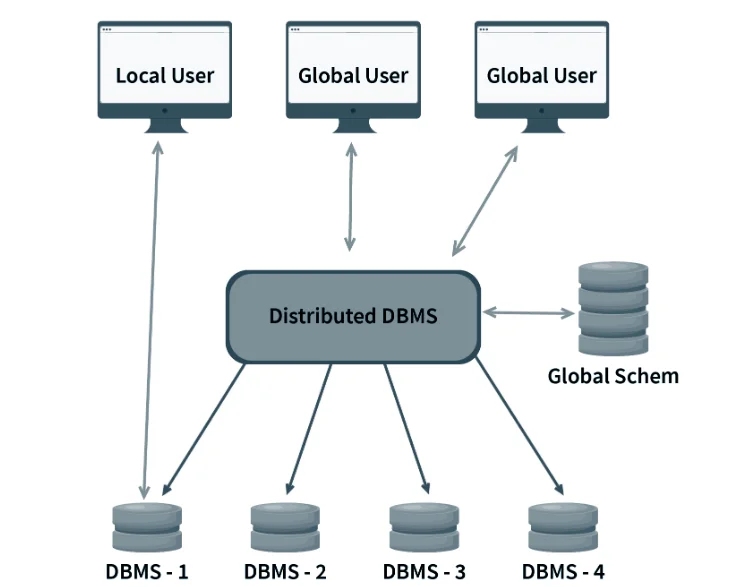
⮚ Distributed database doesn’t store all data and information in the single but store on various sites or places, which are connected by the help of communication, links which helps them to access the distributed data easily.
⮚ In distributed database various portions of a database are stored in multiple different locations along with the application procedures which are replicated and distributed among various points in a network.
Advantages:
⮚ The system can be expanded by including new computers and connecting them to the distributed system.
⮚ Distributed database is more reliable than centralized database.
⮚ The performance and service are better.
⮚ Large numbers of users are supported.
⮚ One server failure will not affect the entire data set.
Disadvantages:
⮚ It is difficult to administrate and manage the database
⮚ It is expensive to set up.
⮚ This database has high risk of hacking and data theft.
Difference between centralized and distributed system
| Centralized database | Distributed database system |
| 1. Simple type. | 1. Complex type. |
| 2. Located on particular location. | 2. Located in many geographical locations. |
| 3. Consists of only one server. | 3. Contains servers in several locations. |
| 4. Suitable for small organizations. | 4. Suitable for large organizations. |
| 5. Less chance of data lost. | 5. More chances of data hacking, lost. |
| 6. Maintenance is easy and security is high. | 6. Maintenance is not easy and security is low. |
| 7. Failure of system makes whole system down. | 7. Failure of one server does not make the whole system down. |
| 8. There is no feature of load balancing. | 8. There is feature of load balancing. |
| 9. Data traffic rate is high. | 9. Data traffic rate is low. |
| 10. Cost of centralized database system is low. | 10. Cost of distributed database system is high. |
Data dictionary:
A data dictionary is a file which contains meta-data that is data about data. It also called information system catalogue. It keeps all the data information about the database system such as location, size of the database, tables, records, fields, user information, recovery system, etc.
Data integrity:
Data integrity referees to the validity or consistency of data in database. It ensures that the data should be accurate and consistent.
Mainly there are 3 types of data integrity constraints used in the database system. They are as:
- Domain integrity constraints: It defines a set range of data values for given specific data field. And also determines whether null values are allowed or not in the data field.
- Entity integrity constraints: It specify that all rows in a table have a unique identifier, known as the primary key value and it never be null i.e. blank.
- Referential integrity constraints: It exists in a relationship between the two tables in a database. It ensures that the relationship between the primary keys in the master table and foreign key in child table are always maintained.
Data Security:
Data security is protection of data in database system against unauthorized access, modification, failure, losses or destruction. The authorized access means only right people can get the right access to the right data.
DBA (Database Administrator)
DBA is the most responsible person in an organization with sound knowledge of DBMS. He/she is the overall administrator of the program. He/she has the maximum amount of privileges for accessing database and defining the role of the employee which use the system. The main goal of DBA is to keep the database server up to date, secure and provide information to the user on demand.
Qualities of good DBA:
- He/she should have sound and complete knowledge about DBMS and its operation.
- He/she should be familiar with several DBMS packages such as MS Access, MYSQL, Oracle etc
- He/she should have depth knowledge about the OS in which database server is running.
- He/she should have good understanding of network architecture.
- He/she should have good database designing skill.
Responsibilities:
- DBA has responsibility to install, monitor, and upgrade database server.
- He/she should has responsibility to maintain database security by creating backup for recovery.
- He/she has responsibility to conduct training on the uses of database.
- DBA defines user privilege, relationships and manages form, reports in database.
The SQL statement for creating, dropping, and altering database and table
XAMPP provides a GUI environment to perform any operations on the database. However, it also provides an option to use SQL statements to perform any operations SQL statements are used in the SQL menu in phpMyAdmin. The SQL statements used in XAMPP also work well with most of the databases.
Creating a database:
Syntax: CREATE DATABASE databasename;
Example: CREATE DATABASE School;
Dropping the database (deleting the database):
Syntax: DROP DATABASE databasename:
Example: DROP DATABASE School:
Creating a table:
Syntax: CREATE TABLE table_name (column1 datatype, column2 datatype, column3 datatype….)
Example: CREATE TABLE Students (StudentID int, FName varchar(255), LName varchar(255), Address varchar(255), Class varchar(255));
Altering table adding, deleting, or modifying columns in an existing table
Adding column Syntax:
Syntax: ALTER TABLE table name ADD column_name datatype
Example: ALTER TABLE Students ADD Email varchar(255));
Deleting column
Syntax: ALTER TABLE table name DROP COLUMN column_name;
Example: ALTER TABLE Students DROP COLUMN Email;
Modifying column (changing the data type of a column in a table)
Syntax: ALTER TABLE table name MODIFY COLUMN column_name datatype;
Example: ALTER TABLE Students MODIFY COLUMN Class int;
Deleting table
Syntax: DROP TABLE table_name;
Example: DROP TABLE Students;
Inserting data
Syntax: INSERT INTO table name (column1, column2 column3,…) VALUES (valuel, value2, value3);
Example: INSERT INTO Students (StudentID, FName, LName, Address, Class) VALUES (‘101’, ‘Ram’, Sharma’, Pokhara’, 7);
Selecting data in selecting data from a database);
Syntax: SELECT column1, FROM table name column2.
Example:
SELECT * FROM Students; (This will select all the columns from the table Students]
SELECT FNAME, LNAME FROM Students: [This will select only the First Name and Last Name from the table Students.]
Selecting data using conditions
Syntax: SELECT column1, column2…. FROM table_name WHERE condition;
Example: SELECT Roll_No, FName FROM Students WHERE Roll_No>10 AND Roll_No<100;
Selecting unique data
Syntax: SELECT DISTINCT column_name FROM table_name;
Example: SELECT DISTINCT address FROM Students;
Sort data
Syntax: SELECT column1, column2, … FROM table_name ORDER BY column1 [ASC|DESC];
Example: SELECT Fname, Lname FROM Students ORDER BY Score;
Deleting data
Syntax: DELETE FROM table_name WHERE condition;
Example: DELETE FROM customers WHERE customer_id = 123;
Updating data using conditions
Syntax: UPDATE table_name SET column1 = value1, column2 = value2, … WHERE condition;
Example: UPDATE Students SET LName = “Sharma” WHERE Roll_No = 121;